Track the questions your buyers really ask
A prompt is a question you ask the assistants on a schedule. WebRank keeps them organised by topic, country and tag, and shows how you and every competitor perform on each one.
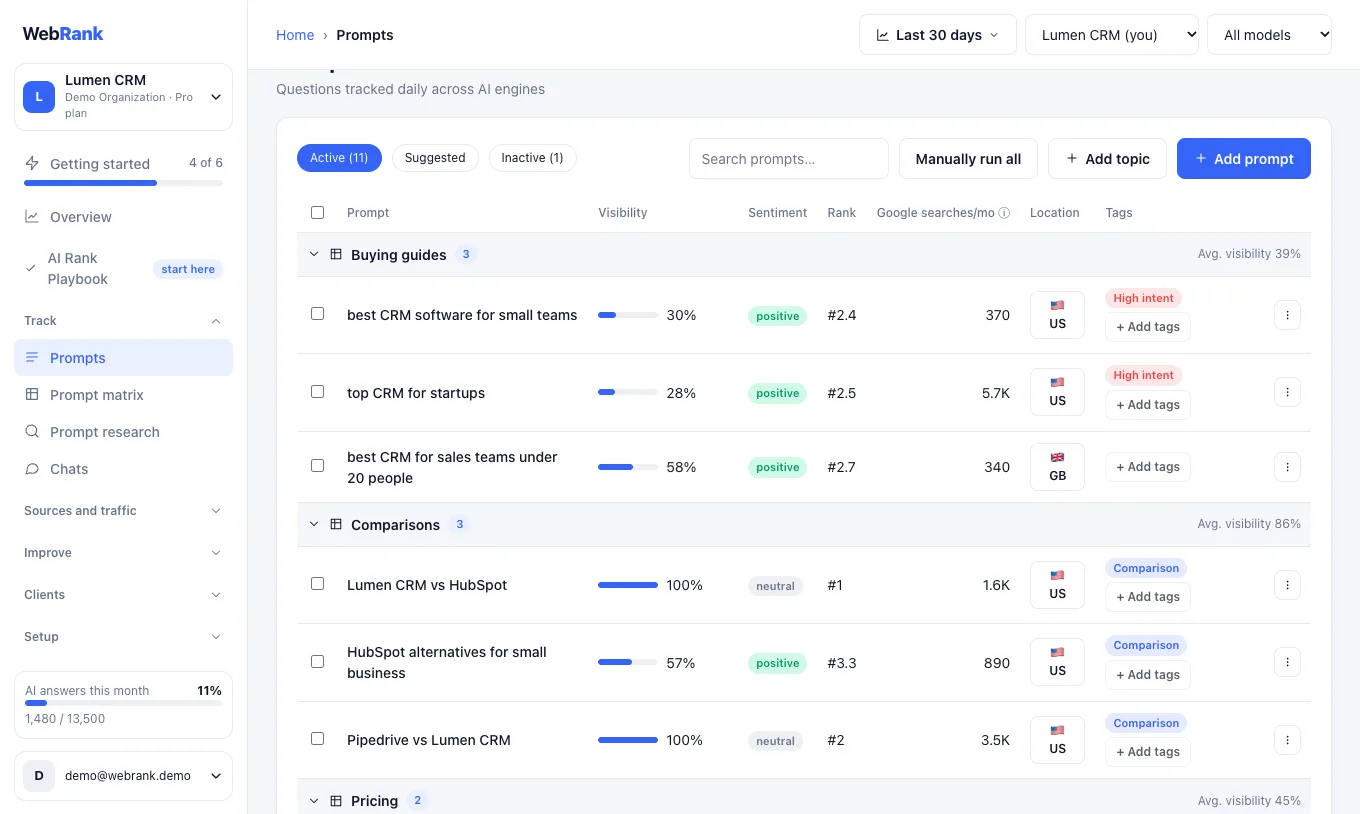
Screenshot and illustration use sample data.
Prompts and Prompt Matrix
What is Prompts and Prompt Matrix?
A prompt is a question you ask AI assistants on a schedule, for example "best invoicing software for freelancers". Prompt tracking in WebRank keeps those questions organised by topic, tag and country, runs them on the assistants you choose, and shows how you and every competitor perform on each one.
By the WebRank team · Updated
Key terms
- Branded prompt
- A question that names your brand. High visibility here shows awareness, not discovery.
- Non-branded prompt
- A question that does not name any brand. The best test of whether new customers find you.
- Competitor prompt
- A question that names a rival, such as "alternatives to X".
- Intent
- Informational (learn), commercial (compare) or transactional (buy).
- Prompt matrix
- A grid of every prompt against every brand.
Why does it matter?
Visibility is only as good as the questions behind it. Track the wrong ones and you either measure nothing useful or flatter yourself with questions that name your own brand. A deliberate prompt set is the difference between a vanity score and a real picture of how buyers find you.
A long prompt list also becomes hard to read. Topics, tags and filters keep it usable, so a team can look at "pricing questions in Germany" separately from "comparison questions in the US".
What you can do
Topics, tags and countries
Group prompts by topic, label them with tags (product, funnel stage, market) and track each one for the country that matters.
Prompt types
Every prompt is labelled branded, competitor or non-branded, and informational, commercial or transactional, so you know which numbers prove growth and which only prove awareness.
Prompt matrix
A grid of every prompt against every brand, so a gap jumps out: the prompt where a competitor wins and you are absent.
Prompt details
Open any prompt for the latest answer per assistant, its sources, how the answer frames you, and every brand named.
Control the cost
Pause prompts you no longer need. Usage is counted in answer runs, so fewer active prompts means a longer-lasting allowance.
How it works
How does Prompts and Prompt Matrix work?
You add prompts by hand, accept the ideas WebRank generates for your business, or pull them from the Question finder. Each prompt belongs to a topic and a country, and can carry any number of tags. WebRank classifies every prompt from its wording: branded (names your brand), competitor (names a rival) or non-branded, and informational, commercial or transactional.
The Prompt matrix lays every prompt against every tracked brand, so you can see at a glance where a competitor wins and you do not. Opening a prompt shows the latest answer for each assistant, the sources it cited, how it framed you, every brand named and the history.
- 01Add promptsType your own, accept our suggestions, or pick questions from the Question finder.
- 02Organise themTopics and tags keep a long list readable. Filters apply to every page.
- 03Open oneSee the answer behind the number and decide what to change.
Illustration with sample data.
You track "best project management tool for agencies" (non-branded, commercial) and "is Acme any good?" (branded). Acme shows 90% visibility on the branded prompt and 8% on the non-branded one. The gap tells you people who already know Acme find it, while new buyers mostly do not, so the work is on being recommended in category questions.
DoTips for getting it right
- Start with 20 to 30 prompts across your real buying questions, then add more only when you know what you will do with the answers.
- Use tags for funnel stage and product so you can filter any page by them.
- Pause prompts you no longer care about instead of deleting the history you may want later.
- Add a few branded prompts as a sanity check, but judge growth on the non-branded ones.
KnowWhat it cannot do
- –A prompt is one wording of a question. Buyers phrase things many ways, so track several variations of an important question.
- –Each prompt run on each assistant uses answers from your monthly allowance, so a very long list on many assistants uses it faster.
What are the common mistakes?
Who uses Prompts and Prompt Matrix?
What you will be able to say
Questions people ask
How many prompts can I track?
There is no cap on the number of prompts. Your plan sets how many AI answers you can collect each month, and each prompt run on each assistant uses some of them.
How often do prompts run?
From weekly to hourly depending on your plan. You can also run them by hand.
What does branded and non-branded mean?
A branded prompt names your brand, for example "Is Acme any good?". A non-branded prompt does not, for example "best invoicing software". Non-branded visibility is the number that shows new customers can find you.
Can I track the same prompt in different countries?
Yes. Each prompt has a country, so you can track a question separately for each market that matters.
What happens to old answers if I delete a prompt?
The answers stay saved. The "active prompts only" switch, on by default, keeps them out of today's numbers.
Can I import prompts?
You can add prompts in bulk by typing or pasting them, and the Question finder adds questions with one click.
Question Finder
See what people ask AI about any topic, in about 90 countries, with estimated demand.
AI Visibility Tracking
The share of AI answers that mention you, tracked every day on the real assistants.
AI Answers
Every answer saved word for word, so you can read exactly what changed.
Find out what AI says about your brand
Start a 3-day free trial with every feature open. Cancel before it ends and pay nothing.
Start free trial