Before an assistant can recommend you, its bots have to read your site
Bot visits are invisible in normal analytics. WebRank shows GPTBot, ClaudeBot, PerplexityBot and others, which pages they read and which pages return errors.
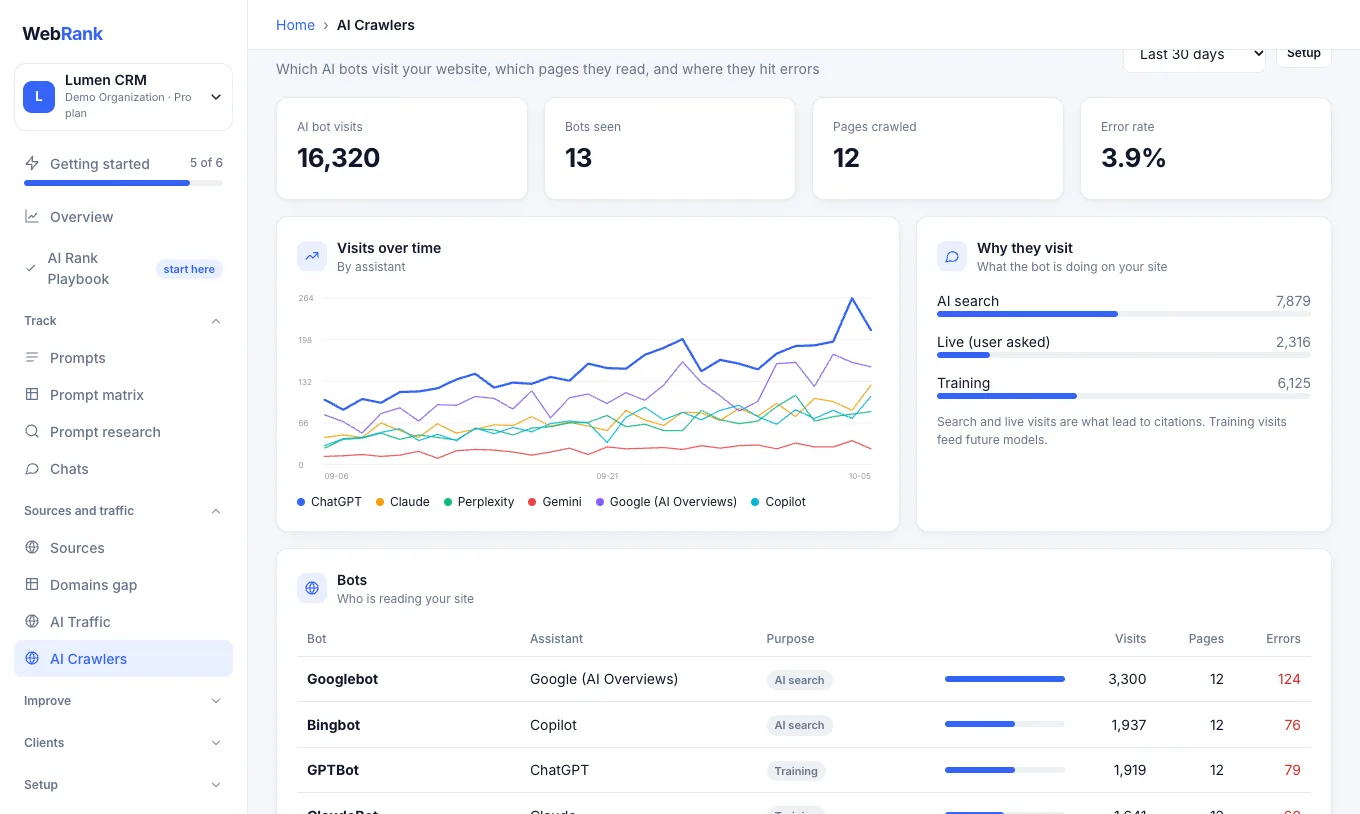
Screenshot and illustration use sample data.
AI Crawlers
What is AI Crawlers?
AI crawler analytics shows which AI bots, such as GPTBot, ClaudeBot and PerplexityBot, request pages from your website, which pages they read, and which pages return errors. It matters because an assistant cannot recommend what its bots cannot read.
By the WebRank team · Updated
Key terms
- AI crawler
- A bot that reads web pages for an AI product.
- Search visit
- A bot searching on a user's behalf, which can lead to citations.
- Live user request
- A bot fetching a page because a user asked.
- Training visit
- A bot gathering content for a future model.
- Error rate
- The share of requests that failed.
Why does it matter?
Bot visits do not show up in normal analytics, so most teams have no idea whether AI systems can reach their site. A blocked bot, a misconfigured firewall or a page that errors can quietly remove you from consideration.
Knowing why a bot visits also helps. Some visits are searches that can lead to citations, some are live requests from a user, and some are training for future models.
What you can do
Bot health at a glance
AI bot visits, bots seen, pages crawled and error rate.
Why they visit
Searching (leads to citations), answering a live user request, or training a future model.
Pages with errors
Pages the bots cannot read, so they cannot cite them.
Guided setup for your platform
WebRank detects where your site is published and shows the steps for it: Cloudflare, Next.js or a Node server, with a copy button for the code.
How it works
How does AI Crawlers work?
A small snippet runs once on your site and reports which AI bot asked for which page, with the response code where available. It does not change your pages and does not collect visitor data. WebRank detects where your site is published and shows the steps for Cloudflare, Next.js or a Node server, with a copy button for the code.
The report shows visits over time, a split by purpose (searching, live user request or training), each bot with its visits, pages and errors, the most crawled pages and the pages returning errors.
- 01Add a small snippet onceIt only reports which AI bot asked for which page. It does not change your pages or collect visitor data.
- 02Wait for the botsBots usually show up within a day.
- 03Fix what failsRepair or redirect pages with errors. If a bot is missing, check robots.txt and your firewall.
Illustration with sample data.
The report shows PerplexityBot never visits, while GPTBot visits daily. Your robots.txt contains a rule that blocks PerplexityBot. You remove it, and within a day the bot appears. Perplexity can now read and cite your pages.
DoTips for getting it right
- Allow the bots you want to be cited by in robots.txt, and check your firewall as well.
- Fix pages that return errors first. A bot that gets an error cannot cite the page.
- Give the snippet a day. Bots do not visit instantly.
- Keep your workspace key out of public code repositories.
KnowWhat it cannot do
- –Shopify, Wix, Squarespace, Webflow and Framer do not allow this kind of code. Put your own domain behind Cloudflare (free), or skip.
- –WordPress sites need Cloudflare in front for now.
- –The Next.js version cannot see error codes, so all visits show as successful.
What are the common mistakes?
Who uses AI Crawlers?
What you will be able to say
Questions people ask
What if my site is on Shopify, Wix or Squarespace?
These platforms do not allow this kind of code. You can put your own domain behind Cloudflare (free), or skip crawler tracking.
What about WordPress?
Not available yet unless the site sits behind Cloudflare.
Does the snippet slow my site?
It only reports a bot's request and does not change the page you serve.
Is visitor data collected?
No. It reports which AI bot requested which page.
How long until data appears?
Within a minute of the first bot visit, and bots usually show up within a day.
Which bots are tracked?
Bots such as GPTBot, ClaudeBot and PerplexityBot, with the assistant and purpose for each.
AI Traffic
The visits AI assistants send to your site, from your own Google Analytics.
Recommendations and AI Rank Playbook
A guided, ordered plan to get recommended, with results measured before and after.
Sources and Citations
The websites and exact pages that assistants quote when they answer.
Find out what AI says about your brand
Start a 3-day free trial with every feature open. Cancel before it ends and pay nothing.
Start free trial