Your visibility data, inside your AI tools
The WebRank MCP server lets Claude, Cursor or any MCP client query your data directly, so you can ask "how did my visibility change this month, and which competitor gained most?"
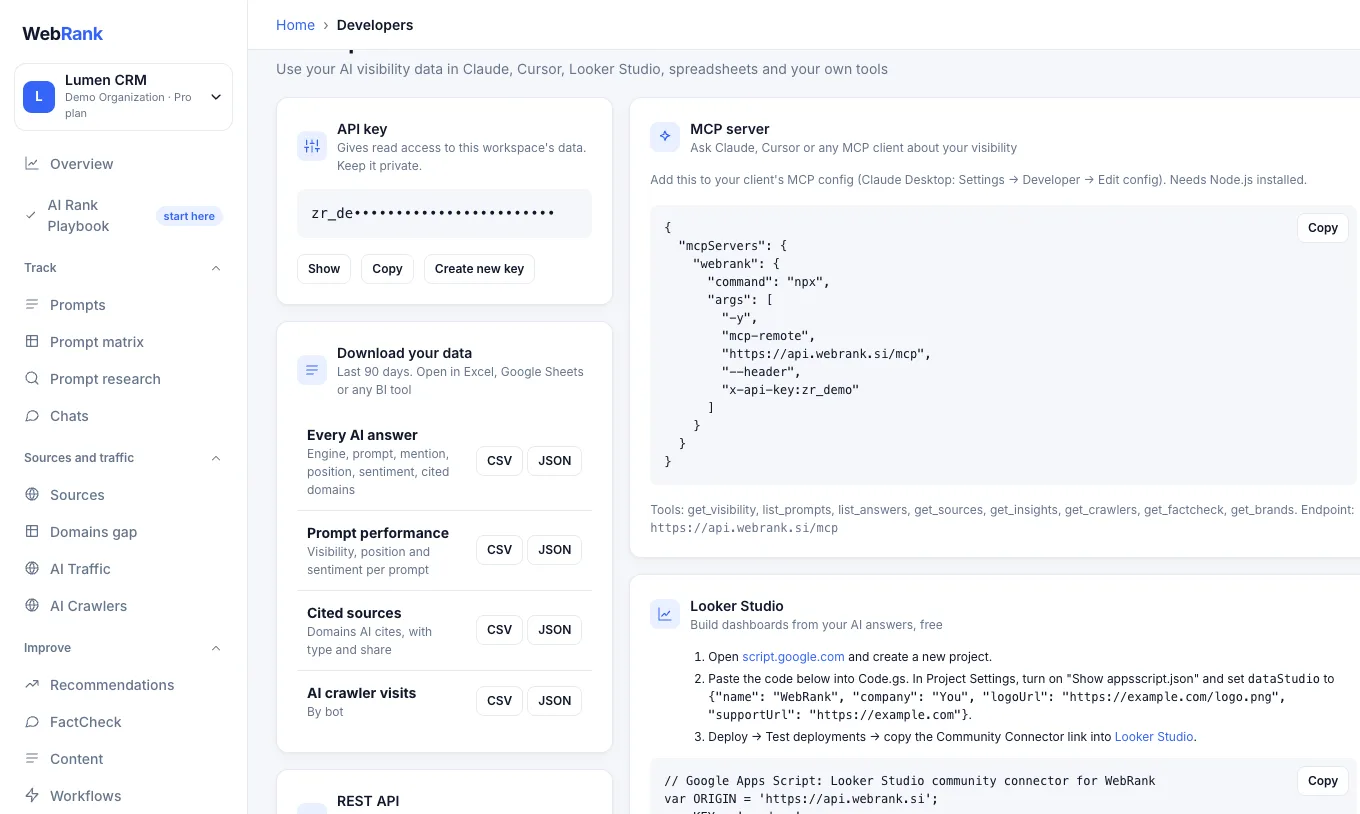
Screenshot and illustration use sample data.
MCP Server
What is MCP Server?
The WebRank MCP server lets AI tools such as Claude Desktop and Cursor query your visibility data in plain language through the Model Context Protocol. You can ask "how did my visibility change this month, and which competitor gained most?" and get an answer drawn from your real data.
By the WebRank team · Updated
Key terms
- MCP
- Model Context Protocol, a standard for connecting data to AI tools.
- Tool
- A function the AI client can call, such as get_visibility.
- Bridge
- The small program that connects the client to the server.
Why does it matter?
People increasingly work inside an AI tool. Switching to a dashboard to look up a number breaks the flow. Connecting your data to the tool they already use removes the step.
It also lets you combine questions across sources, for example asking an assistant to compare your visibility with a spreadsheet of campaigns.
What you can do
Plain-language questions
Ask in the tool you already use.
Real tools behind it
get_visibility, list_prompts, list_answers, get_sources, get_insights, get_crawlers, get_factcheck and get_brands.
Same key as the API
One workspace key, read-only.
How it works
How does MCP Server work?
Copy the configuration from the Integrations page into your MCP client's settings. It runs a small bridge with Node.js that points to https://api.webrank.si/mcp with your workspace key. The server exposes tools such as get_visibility, list_prompts, list_answers, get_sources, get_insights, get_crawlers, get_factcheck and get_brands.
The client chooses which tool to call from your question and returns the result. The key is read-only, so an assistant can read your data but cannot change anything.
- 01Copy the configIt is on the Integrations page.
- 02Add it to your clientClaude Desktop, Cursor or another MCP client. Node.js is needed.
- 03Ask a questionThe answer comes from your real data.
Illustration with sample data.
In Claude Desktop you ask "which prompts did we lose this month?". The client calls list_prompts and get_visibility, then summarises the three prompts where your visibility fell and names the competitor that gained.
DoTips for getting it right
- Use a descriptive question with a period.
- Keep your key private in the configuration file.
- Start with get_visibility style questions before deeper ones.
- Make sure Node.js is installed.
KnowWhat it cannot do
- –Works only with clients that support MCP servers.
- –Answers depend on the client's own AI, so verify important numbers.
What are the common mistakes?
Who uses MCP Server?
What you will be able to say
Questions people ask
Does it work with ChatGPT?
It works with MCP clients. Check whether your tool supports MCP servers.
What do I need?
An MCP client, Node.js and your workspace API key.
Can it change my data?
No. The key is read-only.
Which tools does it expose?
get_visibility, list_prompts, list_answers, get_sources, get_insights, get_crawlers, get_factcheck and get_brands.
Is it free?
It is included on every plan.
API, CSV and Looker Studio
Your data is yours: REST API, CSV and JSON exports and a Looker Studio connector.
Copilot
Ask questions about your own data and run common tasks, in chat.
AI Visibility Tracking
The share of AI answers that mention you, tracked every day on the real assistants.
Find out what AI says about your brand
Start a 3-day free trial with every feature open. Cancel before it ends and pay nothing.
Start free trial