See how often ChatGPT, Gemini, Perplexity and Claude recommend your brand
WebRank asks the assistants your buyers use the questions your buyers ask, saves every answer word for word, and turns them into three numbers you can follow: visibility, position and sentiment.
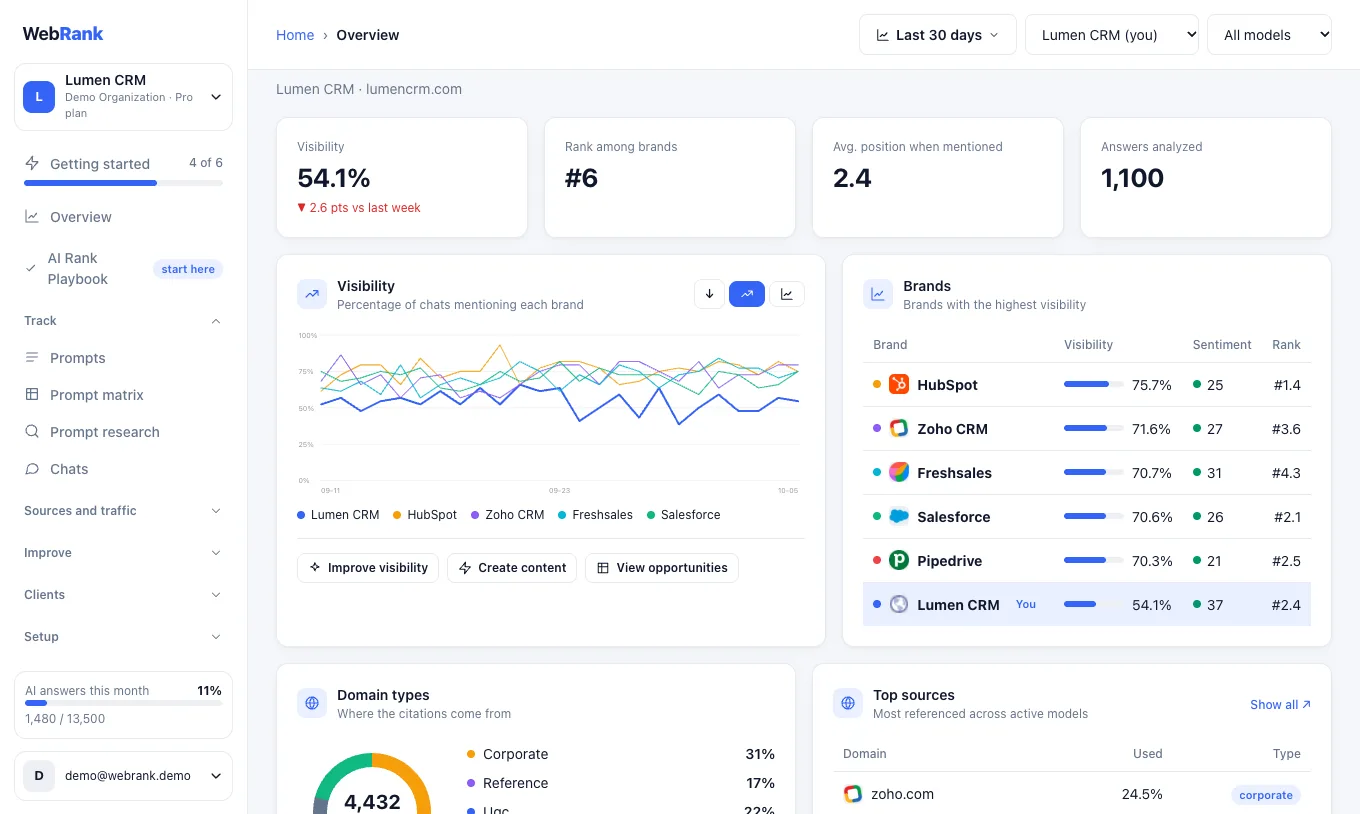
Screenshot and illustration use sample data.
AI Visibility Tracking
What is AI Visibility Tracking?
AI visibility tracking measures how often AI assistants such as ChatGPT, Gemini, Perplexity and Claude mention your brand when people ask questions in your market. WebRank sends your chosen questions (prompts) to the assistants on a schedule, saves every answer word for word, and reports your visibility, position and sentiment against the competitors you track.
By the WebRank team · Updated
Key terms
- Visibility
- The share of saved answers that mention your brand.
- Position
- Where your brand appears among the tracked brands in an answer. Lower is better.
- Sentiment
- Whether the words around your name are positive, neutral or negative.
- Answer
- One prompt asked to one assistant once. This is the unit your plan limits are counted in.
- Active prompts only
- A switch that leaves prompts you deleted or paused out of today's numbers.
Why does it matter?
People now ask an assistant before they open a search engine, and the answer usually names only a handful of brands. If you are not one of them, you do not appear in the consideration set at all, and ordinary analytics cannot show you that moment because no click happens.
AI answers also change from day to day and from assistant to assistant. A single check tells you very little. Tracking the same questions repeatedly turns noisy single answers into a trend you can act on.
What you can do
Visibility
The share of saved answers that mention your brand, per prompt, per assistant and per day. If 3 of 10 answers name you, visibility is 30%.
Position and leaderboard
Where you appear among the brands named in an answer, and how you rank against every competitor you track.
Sentiment
Whether the words around your name are positive, neutral or negative, so a mention that hurts is not counted as a win.
Trend over time
A daily chart with the number of answers behind each point. Today is drawn dotted until the day is complete.
Filters that mean something
Period, brand, assistant, tag, and "active prompts only" so deleted prompts do not distort today's picture.
How it works
How does AI Visibility Tracking work?
Each prompt runs on each assistant you enable. The answer is stored with its date. Visibility is the number of saved answers that mention your brand divided by the number of saved answers in the period you are viewing. A brand counts as mentioned when its name, one of its aliases or its website domain appears in the answer text.
Position is the order in which tracked brands appear inside an answer, so the first brand named is position 1. Sentiment is read from the words around your name, using a fixed list of positive and negative terms, so the result is repeatable and costs no extra AI run. Trends are grouped by UTC day, and the chart shows how many answers sit behind each point.
- 01Add your websiteWebRank reads it, suggests your competitors and the questions your buyers ask. You confirm both lists.
- 02We ask the assistantsYour prompts run on a schedule, from weekly to hourly depending on your plan. Each answer is stored in full.
- 03You read the resultsOpen the Overview for one-screen answers: are we mentioned, where do we rank, who is ahead.
Illustration with sample data.
You track 10 prompts on 4 assistants for one day, which gives 40 answers. Your brand is named in 12 of them, so your visibility is 12 / 40 = 30%. In those 12 answers you are named first 5 times, so you lead on 5 of 12. A competitor named in 20 of the 40 answers has 50% visibility and is ahead of you on this set of questions.
DoTips for getting it right
- Track questions that do not contain your brand name. Those show whether new customers can find you, and they are the numbers that move when your marketing works.
- Give each prompt a few days before judging it. One answer can differ from the next for reasons that have nothing to do with you.
- Compare against two or three real competitors, not twenty. A short honest list makes every ranking meaningful.
- Keep "active prompts only" on so prompts you removed do not distort the picture.
KnowWhat it cannot do
- –The results are samples of what assistants say, not a promise of what one person will see. Answers depend on wording, location and the assistant's own memory.
- –Microsoft Copilot and Meta AI cannot be measured because they offer no public interface.
- –Visibility does not equal traffic or sales. Pair it with AI Traffic to see whether mentions turn into visits.
What are the common mistakes?
Who uses AI Visibility Tracking?
What you will be able to say
Questions people ask
Which assistants do you track?
ChatGPT, Gemini, Perplexity and Claude, plus Google AI Overviews and AI Mode. Grok, DeepSeek and Mistral can be switched on too. Microsoft Copilot and Meta AI have no public API, so they cannot be measured honestly yet.
Are these real answers or simulated ones?
Real. Prompts are sent to the live assistants and each answer is saved as returned. Assistants answer differently each time, so the numbers are sampled results, not a guarantee of what any one person sees.
Why is my visibility 0%?
Most often because your prompts do not name your brand. A prompt like "best CRM for small teams" only shows you if the assistant already knows and recommends you. The Prompts page labels each prompt as branded or non-branded so you can tell which is which.
How often are answers collected?
From weekly to hourly depending on your plan: Starter up to twice a day, Pro up to four times a day, Enterprise up to hourly. Higher frequencies use your monthly answer allowance faster.
How is sentiment decided?
By the words near your name, using a fixed list of positive and negative terms. It is a quick signal, so read the answers behind any score that matters.
Can I export the data?
Yes. Every number can be exported as CSV or JSON, or read through the REST API and the MCP server.
Prompts and Prompt Matrix
Choose the questions to track, group them, and see how every brand performs on each one.
AI Answers
Every answer saved word for word, so you can read exactly what changed.
Competitor Tracking
You confirm the competitor list. WebRank finds every spelling of their names.
Find out what AI says about your brand
Start a 3-day free trial with every feature open. Cancel before it ends and pay nothing.
Start free trial