Publish pages that AI assistants can quote
Assistants quote clear, factual answers. Content helps you write new pages for the prompts you want to win, and rewrite existing ones.
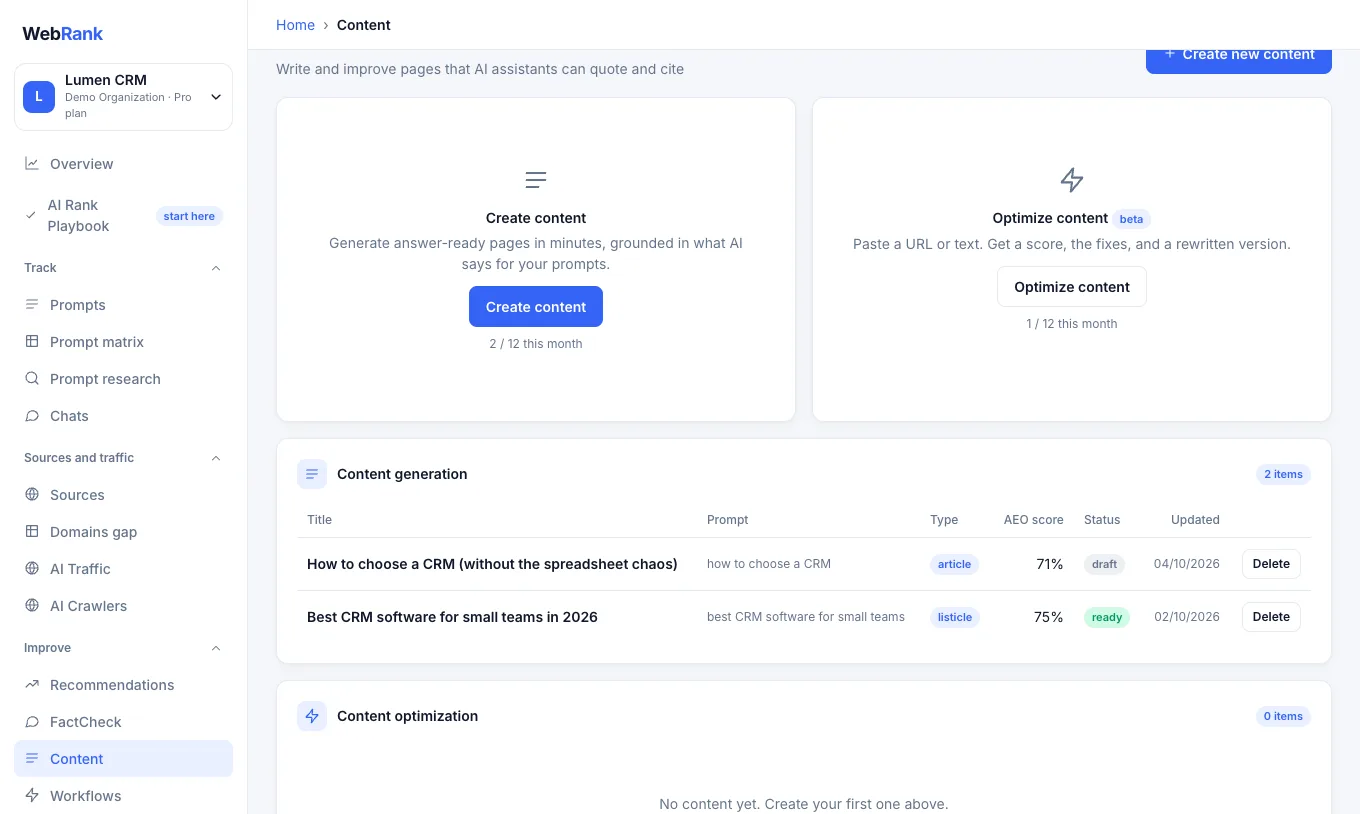
Screenshot and illustration use sample data.
AI Content and Optimization
What is AI Content and Optimization?
AI content in WebRank helps you write and improve pages in the form assistants quote: clear, factual, answer-first. You pick the prompt a page should win and a format, WebRank drafts it from your facts, and you review, edit and publish it yourself.
By the WebRank team · Updated
Key terms
- Format
- The shape of a page, such as comparison, guide or FAQ page.
- Smart Suggestion
- Picks the format that matches what assistants cite.
- Optimization
- A rewrite of an existing page, in beta.
- Placeholder
- A marker such as [ADD: ...] for facts you must supply.
Why does it matter?
Assistants quote pages that answer a question directly and credibly. Many company pages are written to sell, not to answer, so even good products are not quoted. Writing for the question changes that.
Drafting is the slow part. A fast first draft built on your own facts lets a person spend their time on the parts only they can supply: examples, evidence and judgement.
What you can do
Create new content
Choose a format and the prompt it should win, or let Smart Suggestion pick the format that fits.
Optimize existing pages
Give a page address or paste text. WebRank scores it and rewrites it so assistants can quote it more easily. Optimization is in beta.
Uses your facts
Agent Brain feeds your pricing, features and tone into every draft.
You stay in control
A draft takes about 20 to 60 seconds. You review it, add what only you know, and publish it yourself.
How it works
How does AI Content and Optimization work?
Open Content and choose Create new content. Pick a format and the prompt it should win, or let Smart Suggestion choose the format that fits what assistants cite for that prompt. A draft takes about 20 to 60 seconds and uses the facts in Agent Brain, so pricing, features and tone match.
Optimize existing content (beta) takes a page address or pasted text, scores it, and rewrites it so assistants can quote it more easily. You always review the output and publish on your own site. WebRank does not publish for you.
- 01Pick a prompt to winFrom your own list.
- 02Generate a draftEdit it in the built-in editor.
- 03Publish on your siteWebRank never publishes for you.
Illustration with sample data.
For the prompt "best invoicing tool for freelancers", Smart Suggestion proposes a comparison page. The draft opens with a two-sentence answer, then a table of options, then your own strengths with placeholders for real numbers. You fill in facts, check every claim and publish.
DoTips for getting it right
- Always replace placeholders with true, specific facts.
- Answer the question in the first two sentences.
- Check names, prices and claims. You are responsible for accuracy.
- Link the page from related pages so crawlers find it.
KnowWhat it cannot do
- –AI-generated text can contain mistakes. You are responsible for checking facts before you publish.
- –Articles and optimizations are limited per month by plan.
What are the common mistakes?
Who uses AI Content and Optimization?
What you will be able to say
Questions people ask
Is the text always correct?
No. AI-generated text can contain mistakes. You are responsible for checking facts, names, prices and claims before you publish.
How many articles can I make?
Articles and optimizations are limited per month by plan. See the pricing page.
Does WebRank publish for me?
No. You publish on your own website.
How does it know my facts?
From Agent Brain and, if you give it, your website.
What formats are there?
Blog post, listicle, comparison post, alternatives page, FAQ page, product or service page, how-to article, ultimate guide, case study, landing page, and social formats such as a community reply, a LinkedIn post and an X thread. Smart Suggestion picks the one assistants cite most for your prompt.
Find out what AI says about your brand
Start a 3-day free trial with every feature open. Cancel before it ends and pay nothing.
Start free trial