Read exactly what the assistants said, and how it changed
Scores tell you something moved. The answers tell you why. WebRank keeps every answer in full and lays them out by prompt and by day.
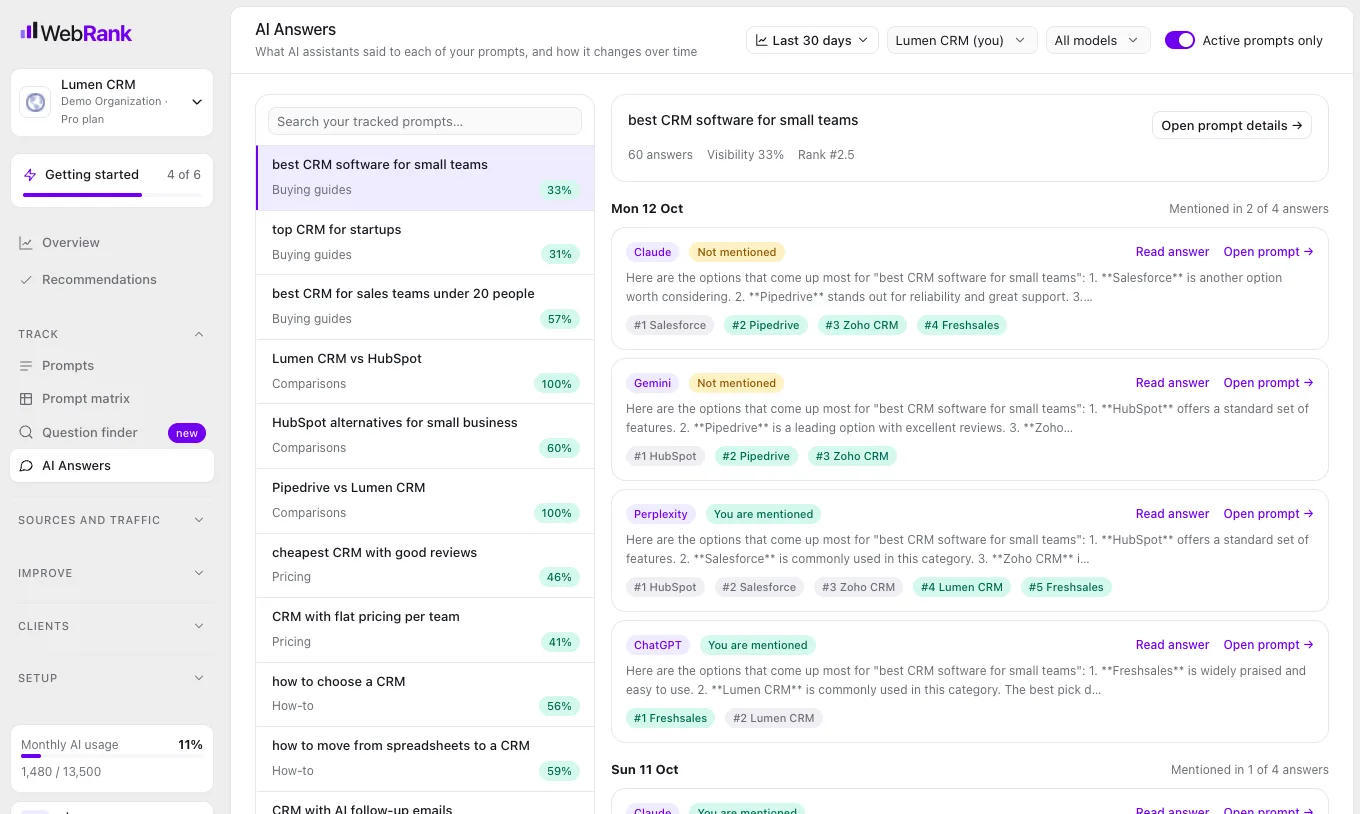
Screenshot and illustration use sample data.
AI Answers
What is AI Answers?
AI Answers is the record of every answer an AI assistant gave to your tracked prompts, saved word for word and grouped by prompt and by day. In WebRank it is where a score turns into evidence: you read exactly what each assistant said, which brands it named and how that changed over time.
By the WebRank team · Updated
Key terms
- Answer
- One prompt asked to one assistant once, with the full text.
- Mention
- A tracked brand named in an answer, with position and sentiment.
- Timeline
- The answers to one prompt grouped by day.
- Source
- A web page the assistant cited, when it shows its sources.
Why does it matter?
A visibility score tells you something moved. It cannot tell you why. The answer text does: a competitor started appearing, a source changed, or the wording about you turned cautious.
Saved answers also protect you from guessing. When a stakeholder asks "what does ChatGPT say about us?", you can show the actual text and the date instead of a screenshot taken by chance.
What you can do
Full text, not summaries
Open any answer and read it as the assistant wrote it, with the brands and sources it named.
A timeline per prompt
See how the answers to one question evolved over weeks, grouped by day with the number of answers that mentioned you.
Mentions at a glance
Each answer shows who was named, in what order, and with what sentiment.
Jump to the detail
From any answer open the prompt page for its sources, framing, brands and citations.
How it works
How does AI Answers work?
Every prompt run stores the assistant, the date, the full answer, the brands mentioned with their position and sentiment, and the sources cited. The AI Answers page lists your tracked prompts on the left. Choose one and the timeline shows each day, how many of that day's answers mentioned you, and a card per assistant.
Open a card to read the whole answer. Links inside answers show the real website instead of generic labels such as "Website", so you can see where each claim points. From any answer you can open the prompt page for sources, framing, brands and citations.
- 01Pick a promptSearch your tracked prompts on the left.
- 02Scan the daysEach day shows whether you were mentioned and by which assistant.
- 03Read the answerOpen one to see the whole text and its sources.
Illustration with sample data.
Over two weeks the answers to "best accounting software for freelancers" go from naming you in 2 of 4 answers per day to 0 of 4. Reading the answers shows a new competitor now appears first and the assistants cite a new comparison article. You know exactly which page to go and get included in.
DoTips for getting it right
- Read at least a handful of full answers each month. Patterns show up that no score can.
- When a number drops, open the days around the drop and compare the wording.
- Look at which sources are cited in the answers where you are missing.
- Use the link from an answer to its prompt page to see all assistants side by side.
KnowWhat it cannot do
- –Assistants answer differently each time, so one answer is a sample. Look across days and assistants.
- –Some assistants do not show sources, so their answers have no source list.
What are the common mistakes?
Who uses AI Answers?
What you will be able to say
Questions people ask
Can I search inside the answers?
You can search your tracked prompts and filter by period, assistant and brand. Answers are shown by prompt, with the full text one click away.
Are old answers kept?
Yes. Answers stay saved, which is what lets trends and before-and-after comparisons work.
Why do some links show a domain instead of a title?
When an assistant gives only a link, WebRank shows the website address. Where the assistant reports a page title, that is shown instead.
Does reading answers use my allowance?
No. Only collecting new answers uses your monthly allowance.
Can I share an answer with a colleague?
You can share a read-only dashboard link from Reports, or copy the text.
Prompts and Prompt Matrix
Choose the questions to track, group them, and see how every brand performs on each one.
AI Visibility Tracking
The share of AI answers that mention you, tracked every day on the real assistants.
Framing, Sentiment and Objections
How AI frames you, and the reasons it gives against choosing you.
Find out what AI says about your brand
Start a 3-day free trial with every feature open. Cancel before it ends and pay nothing.
Start free trial