Know whether AI recommends your brand, and what to do about it
Buyers now ask ChatGPT, Gemini and Perplexity before they search. WebRank shows you what those assistants say about you, in one screen, and tells you what to fix.
Brands and marketers
What is WebRank for brands and marketers?
WebRank for brands is a way to see what AI assistants such as ChatGPT, Gemini, Perplexity and Claude say about your company when buyers ask for recommendations in your category, and to follow a clear plan to be named more often. It is built for founders and marketers who do not have a dedicated SEO team.
By the WebRank team · Updated
Why now
Why does this matter now?
Buyers use assistants differently from search engines. Instead of a page of links, they receive one synthesised answer that names a few options, often with a reason for each. That answer arrives before any visit to your site, so it shapes the shortlist. For a brand this creates two new jobs: knowing what the answer says, and influencing the sources it is built from. Both are measurable, which is why a repeatable tracking routine beats occasional manual checks.
What gets in the way
You cannot see inside AI answers
Analytics shows clicks, not what an assistant said before the click. By the time a buyer reaches your site they have often already formed an opinion from an answer you never saw. WebRank asks the same questions your buyers ask and saves every answer word for word, so you can read what was said and when it changed.
Your competitors may be recommended instead
Assistants usually name only a handful of brands. If a competitor is named first on the questions that matter, they get the consideration you wanted. WebRank shows who is named, in what order, on which assistant, and how each is described, so the gap is concrete.
Nobody tells you what to do next
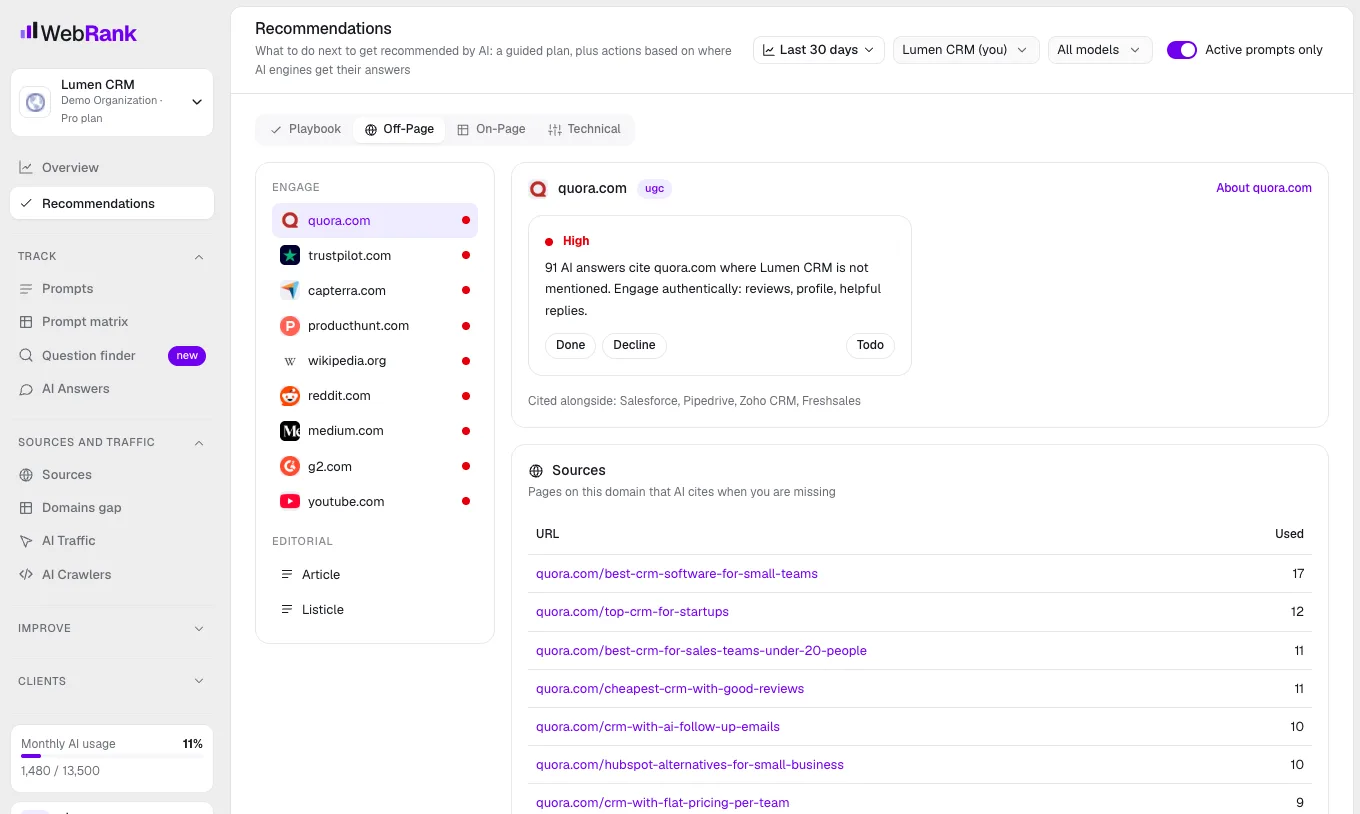
Most monitoring tools stop at the chart. WebRank turns your results into an ordered playbook: technical access first, then pages assistants can quote, then third-party mentions, then fixing wrong claims. Steps tick themselves when WebRank can see they are done.
How it works, step by step
- 01Add your websiteWebRank reads it, works out your category and suggests competitors and the questions your buyers ask. You confirm the lists before anything is created.
- 02Let it collect answersYour prompts run on the assistants you enable, daily or more often depending on your plan. You do nothing.
- 03Read the OverviewOne screen shows visibility, rank and sentiment against competitors, with a trend and the sources behind it.
- 04Follow RecommendationsStart with the step marked high impact and low effort, usually allowing AI bots to read your site.
- 05Fix and re-checkPublish an answer page, earn a mention, correct a wrong claim, then check visibility again in a few weeks.
What should you measure?
What you will use
AI Visibility Tracking
Your headline numbers, tracked every day.
Competitor Tracking
Make sure you are compared with the right companies.
Recommendations and AI Rank Playbook
The plan that turns numbers into work.
Framing, Sentiment and Objections
See the exact reasons AI gives against you.
AI Mistakes
Catch wrong prices, features and claims.
Reports and Shared Dashboards
Show leadership what changed.
What mistakes should you avoid?
Your first-month checklist
- Add your website and confirm your competitors.
- Track at least 20 questions your buyers ask, mostly without your brand name.
- Allow AI bots in robots.txt.
- Write your facts in Agent Brain.
- Publish one page that answers your most important question directly.
- Check visibility again after three weeks.
Questions people ask
What is AI visibility for a brand?
It is how often AI assistants mention your brand when people ask relevant questions. WebRank measures it as the share of saved answers that name you.
Do I need an SEO team?
No. The playbook gives plain-language steps, and technical ones come with instructions you can hand to a developer.
How long until I see results?
Tracking starts immediately. Changes you make usually take weeks to show in answers, so check monthly rather than daily.
Will WebRank guarantee that AI recommends us?
No. No tool can. WebRank shows evidence for each recommendation and measures before and after.
What does it cost?
Plans start at $76 a month with a 3-day free trial that has every feature open.
Start with brands and marketers in mind
Every feature is open for 3 days. Cancel before it ends and pay nothing.
Start free trial