Question finder
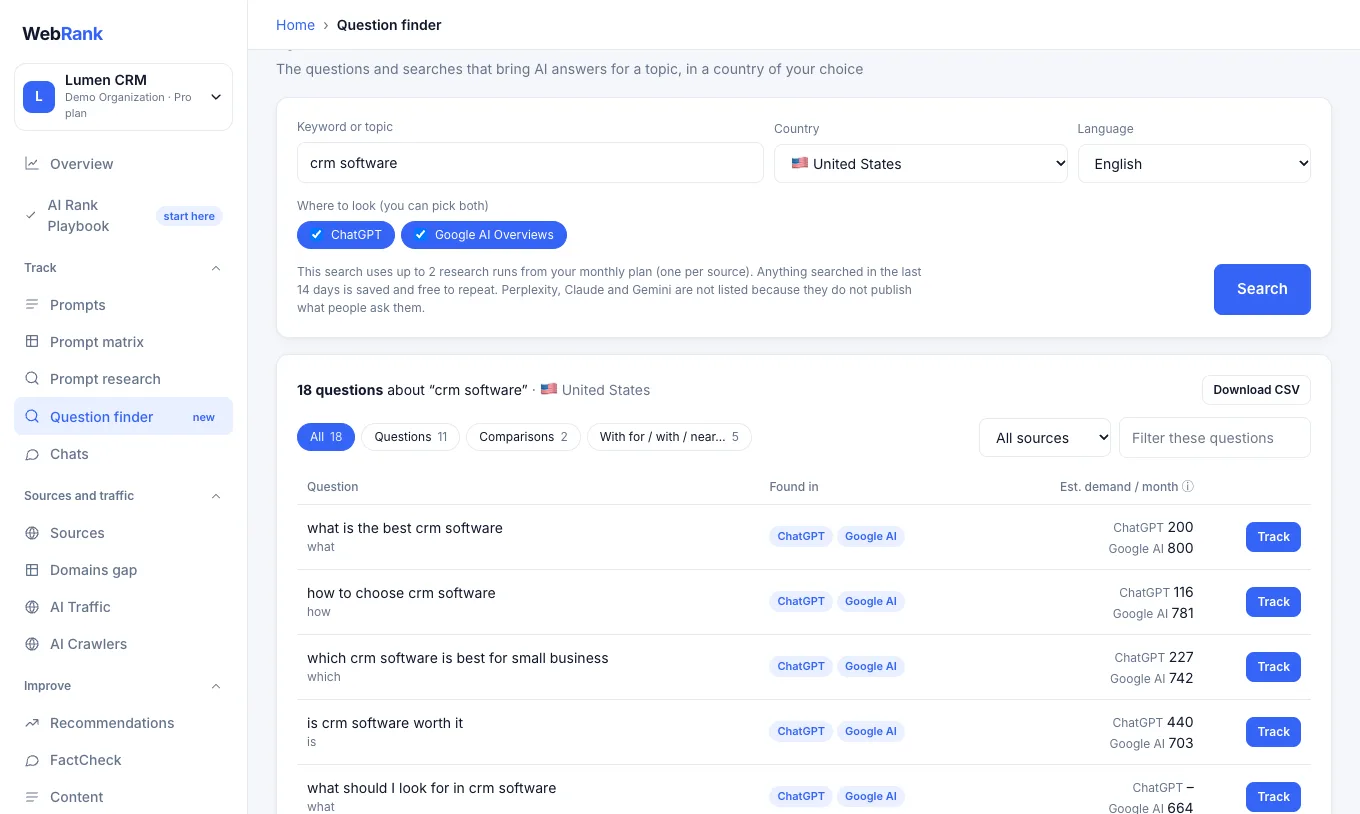
Question finder answers a simple question: what do AI assistants get asked about this topic in my market? Type a keyword, choose a country and where to look, and WebRank lists the questions with an estimate of demand.
Find questions#
- Open Question finder in the sidebar, under Track.
- Type a keyword or topic, for example
project management software. - Choose the country and language of the people you want to reach. The country list shows every country the data covers (about 90). The languages and sources you can pick depend on the country.
- Choose where to look: ChatGPT, Google AI Overviews, or both.
- Press Search. Results appear in a few seconds. If you chose both sources, you get one combined list.
Where the questions come from#
You can look at ChatGPT and Google AI Overviews, one or both. The questions and an estimated demand per month come from a third-party database of AI assistant responses.
Coverage differs: Google AI Overviews has data for about 90 countries and many languages, while ChatGPT data exists only for the United States in English. For other countries the ChatGPT option is greyed out and the page says why.
Perplexity, Claude and Gemini are not offered. They do not publish what their users ask, so no tool has real data on them, and we prefer to show nothing over inventing it. You can still track any question on all of them: once you track a question, WebRank asks it to every assistant you have enabled.
Read the results#
| Column | Meaning |
|---|---|
| Question | The question, with its type (what, how, which…, comparison for "vs" and "alternatives", or the preposition: for, with, near…) |
| Found in | Which source returned it. A question found by both appears once |
| Est. demand / month | A modelled estimate of how often the question is asked. A dash means the source had no estimate for that question |
Questions with the highest estimated demand come first. Use the tabs to see only Questions, Comparisons or questions with prepositions, choose one source from the All sources menu (when you searched both), filter by a word, and use Download CSV to take the list into a spreadsheet. The sites these answers cite list shows where assistants get information on this topic, which are good places to earn a mention.
Track the ones that matter#
Choose Track next to a question to add it to your prompts. From then on WebRank asks it to your chosen assistants every day and shows whether they recommend you.
About the numbers#
The questions and volumes come from a third-party database of AI assistant responses. The provider does not publish how its questions or volumes are collected, so treat the volumes as modelled estimates that help you compare questions with each other, not exact counts. No tool can show exact numbers, because AI assistants do not share what their users ask.
Usage#
A new search uses research runs from your monthly plan (see Plans and limits): one for each source you choose. The page shows the number before you search. Anything searched in the last 14 days is saved and free to repeat. If a source is unavailable, the others still return, and you are charged only for the sources that worked. Some countries and languages have little data, in which case the page says so and suggests trying English or another country.
Related#
Was something unclear or missing? Tell us. Last updated 2026-10-06.